
The title of this article contains a trap, and it’s worth clearing up in the first sentence, because getting it wrong can get you banned.
You do not register for AdSense again when you launch a second site. You are allowed exactly one AdSense account for your entire life. A second site gets added to the account you already have. People who don’t know this create a new account for their new domain, and AdSense rejects it as a duplicate, permanently, in a way that’s genuinely painful to undo.
So this is really about adding a site to your existing account, what happens after you do, and the two status messages that make everyone think something has gone wrong when it hasn’t.
One Account, Many Sites
The rule is in the AdSense program policies, stated plainly: you may not have more than one account, unless you’re formally authorised to as a network operator. For a normal publisher, one account is the whole allowance.
That one account holds as many sites as you like. Each one is added, reviewed and approved on its own, but they all sit under the same login, the same payment details, and the same single payment threshold. Your earnings from every site add up toward one payout, which is usually what people actually want anyway.
The important consequence: a second account isn’t a workaround, it’s the specific thing that ends accounts. If you have a friend or a business partner who genuinely owns their own separate sites, that’s a different situation. But two accounts operated by the same person is the exact pattern AdSense’s systems are built to catch.
Before You Add Anything
A new site faces the same review your first one did. Adding it before it’s ready just starts a clock you’re going to fail. So confirm the new domain has what AdSense looks for, before you submit it.
Real content, enough of it, that offers something the web didn’t already have. A privacy policy, a contact page, and an about page that names a real person. Clear navigation. Nothing half-built or under construction. And critically, it has to be live on its own domain, not a staging URL.
The bar is the same one your first approval had to clear, and if that approval is still fresh in your memory, apply everything you learned from it here. A thin second site doesn’t just fail on its own. It’s a signal about the account.
Adding the Site
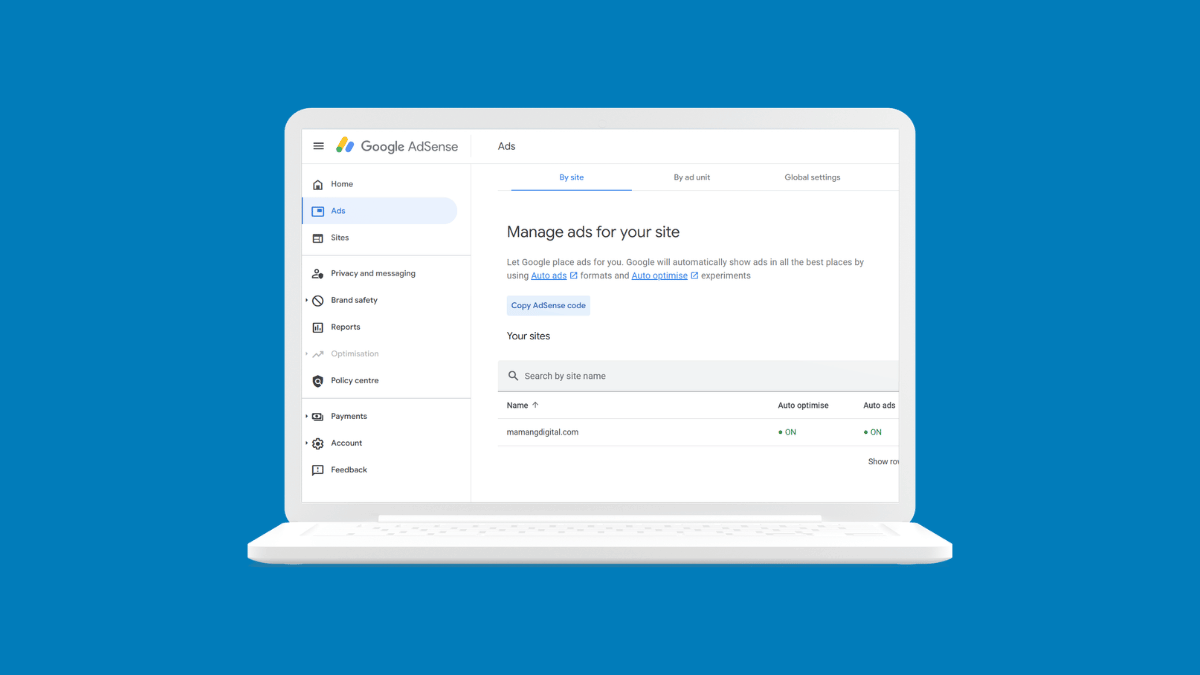
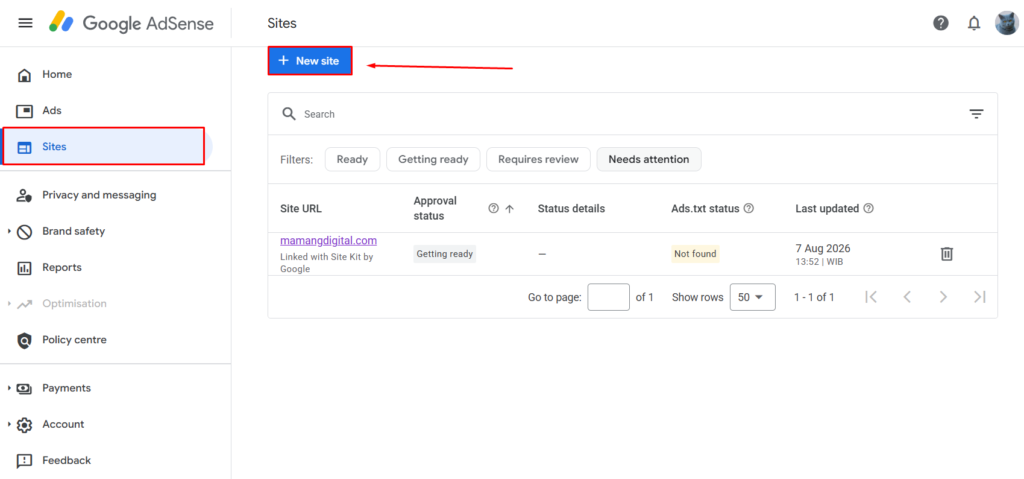
In your AdSense dashboard, go to Sites in the left menu, then click New site.
A small Add Site box appears with a single Website field. Type the domain without http and without www. Just yourdomain.com. Click Save.
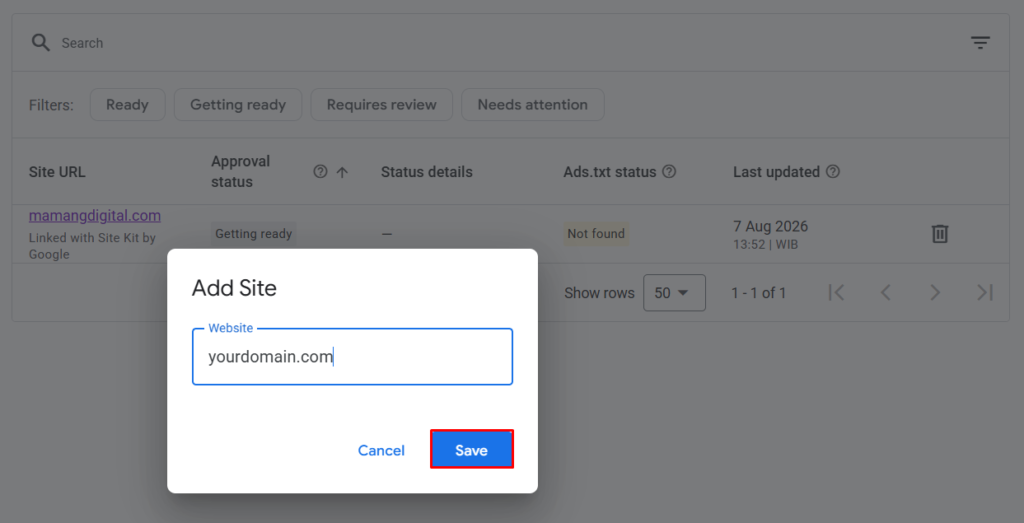
The site now appears in your Sites table with a status, and that status is where the confusion starts.
Placing the Ad Code
Adding the domain to the list isn’t enough on its own. AdSense won’t review a site until it can find its ad code on the pages, because that code is how it confirms you actually control the site.
Google’s documentation is specific about this: the review can’t start until the code is on the site. So this step is not optional and it’s not “later”.
You have two ways to place it.
Auto ads. AdSense gives you a snippet that goes in the <head> of every page. On WordPress, the cleanest route is Site Kit by Google, which places it for you without touching theme files. On Blogger it goes into the theme before the closing head tag.
An ad unit in the body. If you’d rather control placement, a single ad unit in the page body also satisfies the requirement for review.
Either one works to trigger the review. Once the code is live, AdSense crawls the site and the process begins.
The ads.txt Warning
Almost immediately you’ll see an ads.txt column showing Not found, often in a colour that looks like an error. It isn’t blocking your review, but it is worth fixing, and the guides that ignore it leave money on the table.
ads.txt is a small text file that lists who is authorised to sell ads on your domain. Without it, some advertisers won’t bid on your inventory, because they can’t verify it’s legitimately yours. It’s an anti-fraud measure, and a missing one quietly lowers what you earn rather than stopping ads outright.
AdSense gives you the exact one line to put in it, containing your publisher ID. The file lives at yourdomain.com/ads.txt.
| Platform | How to add it |
|---|---|
| WordPress with Site Kit | Site Kit can create and manage it for you |
| WordPress, manual | Upload ads.txt to your root folder by FTP or file manager |
| Blogger | Settings » Monetisation » Enable custom ads.txt, then paste the line |
It can take a day or so after you add the file for AdSense to recheck and change the status to Authorised. That delay is normal. Don’t add the file twice because the status didn’t flip within an hour.
What “Getting Ready” Actually Means
Your new site will show Getting ready, and this is the status that generates the most worried searches. It means one thing: your site is in the review queue and no decision has been made yet.
It is not a problem. It is not a rejection. It is not something you fix. It’s a waiting room.
Google’s own guidance puts the timeline at a few days, sometimes two to four weeks. On a brand-new site with little crawl history it tends toward the longer end. You’ll get an email when there’s a decision, approved or not.
Here’s what “Getting ready” looks like against the other states you’ll meet:
| Status | What it means | What to do |
|---|---|---|
| Getting ready | In the review queue | Wait. Don’t resubmit. |
| Ready | Approved, ads can serve | Nothing. It’s done. |
| Requires review | Needs you to request a review | Confirm the site’s ready, then request it |
| Needs attention | A problem is blocking it | Open it and read the specific reason |
The single worst thing you can do while a site says Getting ready is to keep poking it. Removing and re-adding the site, or repeatedly requesting review, resets your position and signals impatience to a system that rewards none of it. Set the tab aside for a week.
If It Says “Needs Attention”
This is the one status that asks something of you, and it always comes with a stated reason. Click into the site and read it, because the fix depends entirely on what it says.
The most common reason is the same one that stops first approvals: Low value content. It means the site doesn’t yet offer enough that’s genuinely useful, and it’s a content judgement rather than a technical fault. No setting fixes it. It’s fixed by making the site better and then requesting another review.
Only tick the box that says you’ve fixed the issues once you actually have. Requesting review after review with no real change between them is a good way to train the system to take you less seriously.
A Note on Site Kit and “Linked with Site Kit”
If you connected your site through Site Kit by Google, you’ll see it labelled that way in the Sites table, and the review flows through the same queue with the same statuses.
Site Kit is worth using specifically because it handles the parts people get wrong: it places the ad code without you editing theme files, and it can manage ads.txt for you. On WordPress it removes two of the three things that go wrong in this whole process.
One thing it doesn’t change: approval is still AdSense’s decision, made on the same timeline, against the same content standards. Site Kit makes the plumbing easier. It doesn’t make review faster or easier to pass.
Quick Answers
Do I need a second AdSense account for a second site? No, and creating one is against policy. Add the site to your existing account.
Do my earnings combine? Yes. All sites feed one balance and one payment threshold.
Does the new site need its own review? Yes. Every site is reviewed separately even though the account is already approved.
My first site is approved. Is the second automatic? No. An approved account speeds nothing up for a new domain. It stands on its own content.
Can I add a subdomain or a subfolder? You add the root domain. Ads can then run across its pages, including subfolders. A separate subdomain is treated as its own site.
How long does Getting ready last? Days to a few weeks. There’s no way to speed it up and requesting review repeatedly doesn’t help.
The Short Version
One account, forever. Add each new site under Sites » New site, place the ad code so the review can start, and add ads.txt so you’re not leaving revenue behind. Then wait through Getting ready without touching anything.
The one mistake that actually costs you is the one the title tempts you toward: registering a second account for the second domain. Don’t. That’s the thing AdSense doesn’t forgive, and it’s completely avoidable.