You have thought about starting a blog for a while now. Maybe you have even opened a “how to start a blog” guide before, gotten three steps in, hit a wall of “buy this hosting now,” and quietly closed the tab. If that is you, this guide is different.
Most blogging guides are written by people earning a commission every time you buy hosting through their link. That is why they rush you to pull out your credit card on step one. This guide does not sell hosting, so we can be honest with you about what you actually need, what you can delay, and what you can skip entirely.
By the end, you will understand the real steps to starting a blog, the honest differences between the free and paid paths, and how to begin without wasting money or getting overwhelmed. Let us walk through it calmly.
Before Anything Technical: Decide What You Will Write About
Here is the step almost every guide skips so they can rush you to checkout. Before you buy anything, before you pick a platform, you need a rough answer to one question: what will this blog be about?
This matters because a blog with no clear focus rarely survives. You do not need a perfect, final niche today, but you need a direction. Think about what you could happily write twenty articles about. What do people ask you for advice on? What could you keep writing about months from now, when the initial excitement has faded? That last question is the real test, because consistency, not a clever topic, is what makes blogs work.
A quick reassurance: your niche can evolve. Many successful blogs look different a year in than they did at launch. So pick a direction that genuinely interests you, enough to sustain you through the quiet early months, and allow yourself to refine it later. Choosing something you care about beats chasing whatever sounds profitable, because you will actually keep going.
Choose Your Blog Name (and Keep It Simple)
Once you have a direction, you need a name. This trips people up for days, but it does not have to. Your blog name is usually also your web address, so keep it short, easy to spell, and easy to say out loud.
You have a few sensible options. Use your own name, which is flexible if your topic might change. Use a name that hints at your topic. Or invent a simple brand word. Avoid numbers, hyphens, and clever misspellings, because they confuse people trying to find you later. If you say your blog name out loud and someone could type it correctly without asking, it is a good name.
Do not get stuck here for weeks chasing perfection. A clear, simple name you can live with today beats an imaginary perfect one that keeps you from ever starting. You can always build a brand around a plain name through good content.
The Big Decision: Free Blog or Self-Hosted?
This is the fork in the road, and it is where honest guidance matters most. There are two broad paths to putting a blog online, and the right one depends entirely on your goals, not on what earns someone a commission.
The free path means using a platform that hosts your blog at no cost, like WordPress.com’s free plan or Blogger. You get online in minutes, pay nothing, and handle no technical setup. The trade-offs are real, though: your web address usually looks like yourblog.wordpress.com rather than your own domain, your design and features are limited, and on free plans you generally cannot run your own ads to earn money. The platform also has significant control over your site.
The self-hosted path means using the free WordPress.org software on hosting you pay for, with your own domain name. This is what most serious bloggers use. You own and control everything, your site looks fully professional, and you can monetize freely. The trade-offs are that it costs a few dollars a month and involves a little more setup, though far less than it sounds.
Here is the honest recommendation, free of any sales motive. If you are just testing whether you enjoy blogging and do not mind the limits, starting free is a perfectly reasonable way to learn. But if you already know you want to grow the blog, build a brand, or eventually earn from it, the self-hosted path is worth it from the start. Migrating a free blog to self-hosted later is possible but genuinely messy, so if you are fairly sure of your intentions, starting where you mean to continue saves you a future headache.
Clearing Up the WordPress.com vs WordPress.org Confusion
This single naming overlap confuses almost every beginner, so let us settle it plainly, because guides love to gloss over it. They sound identical but are two different things.
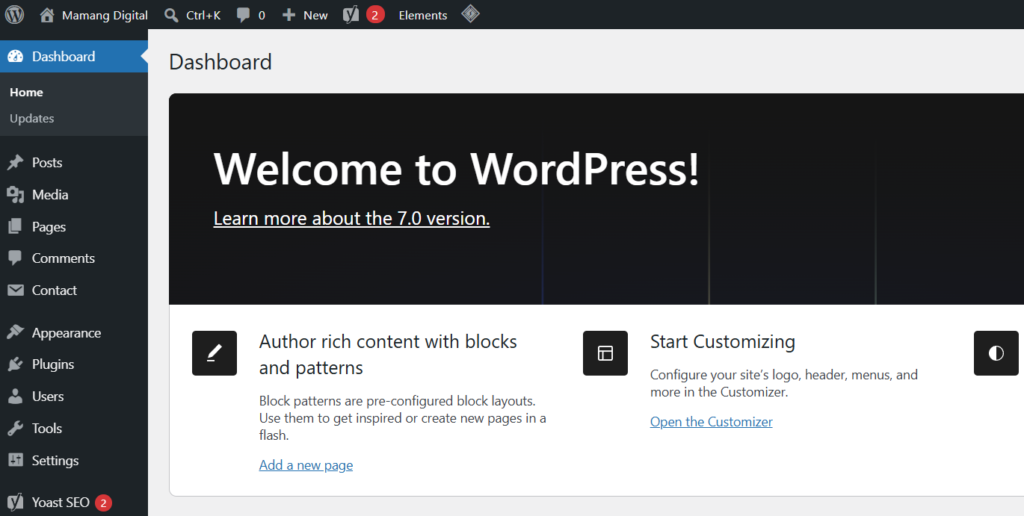
WordPress.org is the free, open-source software you install on your own hosting. When people say “self-hosted WordPress,” this is what they mean. It powers a huge share of the web and gives you total control, but you provide the hosting and domain yourself. This is the version that runs serious blogs and businesses.
WordPress.com is a hosted service from a company called Automattic that runs on the same underlying software, but manages everything for you. It has a free plan with limits and paid plans that lift them. It is easier to start but more restricted unless you pay for higher tiers.
The short version: WordPress.org is the software, WordPress.com is a service that hosts that software for you. For a blog you intend to grow and own completely, most people land on self-hosted WordPress.org. For the easiest possible free start, WordPress.com or Blogger will do.
What It Actually Costs to Start a Blog
Money is where guides get vague or misleading, so here are honest numbers. If you go the free route, your cost is zero, with the limits described above. If you go self-hosted, the real essentials are just two things.
You need a domain name, your web address, which typically costs around 10 to 15 dollars a year. And you need hosting, the service that stores your blog and serves it to visitors, which for a beginner shared plan commonly runs a few dollars a month. Many hosts include a free domain for the first year. So a realistic first-year cost for a self-hosted blog is modest, often somewhere in the range of 50 to 100 dollars depending on the host and plan length.
Now the part guides will not tell you, because they want the sale: almost everything else can wait. You do not need a premium theme, paid plugins, a logo designer, or expensive tools to start. Free versions cover all of it at the beginning. The honest minimum to launch a self-hosted blog is a domain, basic hosting, and free software. Spend on extras later, only when a real need appears, never before.
Getting Your Blog Online, Step by Step
Assuming you have chosen the self-hosted path, here is the actual sequence, without the artificial urgency. None of this requires coding.
First, register your domain and sign up for hosting. Most beginner hosts let you do both together, and many throw in the domain free for the first year. Choose a basic shared hosting plan to start; you do not need anything bigger yet.
Second, install WordPress. Nearly every host offers a one-click WordPress installer in their dashboard, so this is genuinely a matter of clicking a button and waiting a minute. You do not install anything on your own computer.
Third, log in to your WordPress dashboard. This is your control center, reached by going to yourdomain.com/wp-admin. Everything from here on happens inside this friendly dashboard, no technical files involved.
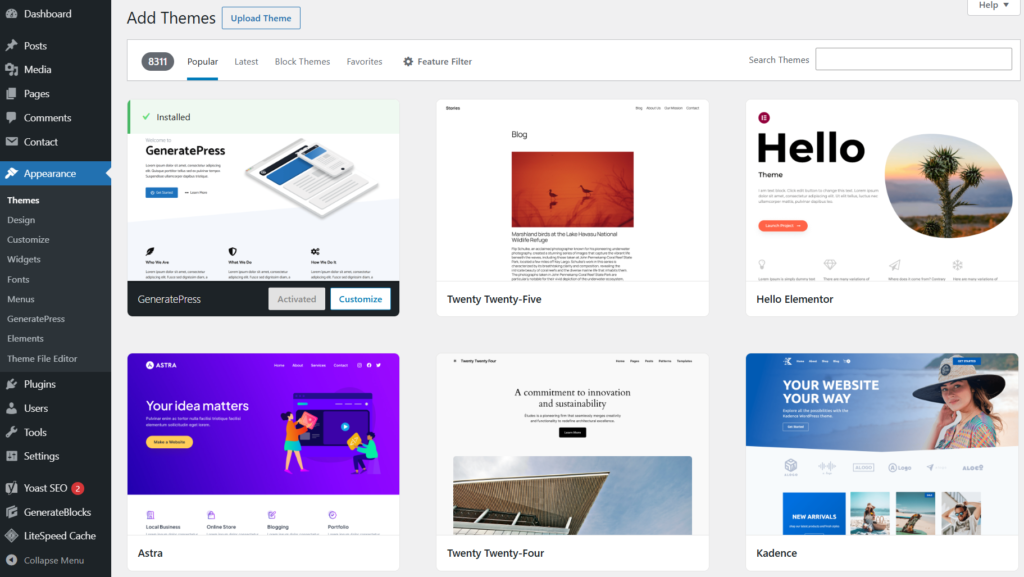
Fourth, pick a theme, which is your blog’s design. WordPress has thousands of free themes you can browse and apply from inside the dashboard under Appearance, then Themes. Choose a clean, fast, simple one to start. You can change it later, so do not agonize.
That is the entire technical setup. People who have never built a website finish this in under an hour. The steps sound intimidating written out, but each one is a few clicks in a guided interface.
The Essential Pages to Create Before You Launch
Before you start publishing posts, set up a few core pages. These are different from blog posts: pages are permanent (like About), while posts are your dated articles. A handful of pages make your blog look complete and trustworthy, and some are genuinely important if you ever want to earn from the blog.
Create an About page that tells readers who you are and why they should trust your writing on this topic. Create a Contact page so readers, and later potential partners, can reach you. And create a Privacy Policy, which is legally required in most regions if you collect any visitor data, which you almost certainly will through basic analytics. If you plan to use affiliate links or give advice, a Disclaimer page is wise too.
These pages are not busywork. They are exactly what advertising programs and readers look for to judge whether a site is real and reliable. Setting them up early means your blog looks finished from day one rather than half-built.
Writing and Publishing Your First Post
Now the part that actually matters: content. Your setup can be perfect, but a blog with no posts is not a blog. The good news is publishing is simple. In your dashboard, go to Posts, then Add New, and you are in the editor, which works much like writing a document.
For your first post, do not aim for perfection. Write something genuinely useful for the readers you pictured earlier, in your own voice, drawing on what you actually know. Real experience is what makes a blog worth reading and what increasingly separates content people trust from generic filler. Add a clear title, break the text into short sections with headings, include an image or two, and publish.
A common question is how many posts you need before launching. A few solid posts, say three to five, is a reasonable start, so visitors have something to explore. But do not let that number become another excuse to delay. The bloggers who succeed are the ones who publish, learn, and keep going, not the ones who wait until everything feels ready, because it never quite does.
After You Launch: Helping People Actually Find Your Blog
Publishing your blog is the start, not the finish. The hard truth most guides underplay is that no one finds a new blog automatically. You could write brilliant posts and hear crickets for weeks, and that is normal, not failure.
This is where search engines become your best long-term friend. When your blog shows up in Google for things people search, you get steady visitors without paying for ads. But Google has to find and understand your blog first, and that takes some deliberate setup. The very first move is telling Google your blog exists, which we walk through in our guide on how to add your website to Google Search Console.
From there, learning the basics of how blogs get found is what turns a quiet new site into one that grows. If you ever search for your blog and panic when it does not appear, our guide on why your website is not showing up on Google explains what is happening and why it is usually normal at first. Getting found is a skill you build gradually, right after you have something published worth finding.
The Mindset That Actually Makes Blogs Work
Let us end with the thing no setup checklist captures. The biggest reason blogs fail is not the wrong theme or platform or host. It is that people stop. They expect quick results, hit the quiet early stretch, and give up right before consistency would have started to pay off.
So treat your blog as a long-term project, not a lottery ticket. Publish useful things regularly, improve as you learn, and give it the months it genuinely needs. You do not have to be perfect, and you do not need every tool or trick. You need a clear direction, a simple setup, and the patience to keep showing up. Start where you are, with what you have, and refine as you go. That is how every blog worth reading began.
Frequently Asked Questions
Can I really start a blog for free?
Yes. Platforms like WordPress.com’s free plan and Blogger let you start at no cost. The trade-offs are a branded web address, limited design and features, and usually no ability to run your own ads. It is a fine way to test whether you enjoy blogging, though serious bloggers tend to move to self-hosting.
How much does it cost to start a self-hosted blog?
The essentials are a domain name (around 10 to 15 dollars a year) and hosting (a few dollars a month on a beginner plan), with many hosts including a free domain for year one. A realistic first-year cost is often in the 50 to 100 dollar range. Almost everything else, like premium themes and paid plugins, can wait.
Do I need to know how to code to start a blog?
No. Modern platforms are built for non-technical people. Hosting installs WordPress with one click, themes are applied from a menu, and writing a post is like writing a document. You can run a full blog without ever touching code.
How many posts should I have before launching?
Three to five solid posts is a good starting point, so visitors have something to read. More important than the exact number is not using it as an excuse to delay. It is better to launch with a few genuine posts and keep publishing than to wait endlessly for a perfect debut.
How long until my blog gets traffic?
Usually months, not days, especially from search engines. New blogs take time for Google to find, trust, and rank. Seeing little traffic in the first weeks is completely normal. Consistent, useful content plus basic SEO setup is what gradually builds steady visitors over time.