Everyone seems to tell you to put your blog on Cloudflare. Speed, security, free, set it up in five minutes. But you run a small blog with modest traffic, and a part of you wonders whether this is something you genuinely need or just another thing people add because everyone else does. It is a fair question, and the honest answer is not a simple yes.
This guide answers it straight: what Cloudflare actually does, whether a small blog really benefits, when it is worth setting up, and the one setup mistake that can break a WordPress site. No pressure to install it, just an honest look so you can decide for yourself.
What Cloudflare Actually Does, in Plain Terms
Before deciding if you need it, you need a clear picture of what it is, without the jargon. Cloudflare sits between your visitors and your website’s server, acting as a fast, protective middle layer that your traffic passes through.
It does two main jobs from that position. First, speed: it is a content delivery network, or CDN, meaning it keeps copies of your site’s static files (like images and stylesheets) on servers around the world, so a visitor loads them from a nearby location instead of your one distant server. Second, security: it filters incoming traffic, blocking many malicious bots and absorbing certain attacks before they ever reach your site. It also provides a free security certificate so your site can run on the secure version of the web. In short, it aims to make your site a bit faster and meaningfully safer, mostly invisibly.
The Honest Answer: Need vs Benefit
Here is the distinction most guides skip. There is a difference between something you strictly need and something that helps. For a small blog, Cloudflare is rarely a strict need, but it is often a genuine, low-cost benefit. Your blog will work fine without it. It may simply work a little better with it.
The reason it leans toward “worth it” for many small blogs is the price: the free plan is genuinely free and genuinely useful, not a crippled trial. So the real question is not “do I desperately need this” but “is a free layer of speed and security worth a one-time setup”. For most people, framed that way, the answer tilts toward yes, with some honest caveats we will get to. What you should not do is treat it as mandatory or panic that your blog is unsafe without it. It is an optional upgrade, not a requirement.
What the Free Plan Actually Gives a Small Blog
Since the free plan is the relevant one for a small blog, let us be specific about what it includes, because it is more generous than most free tiers anywhere.
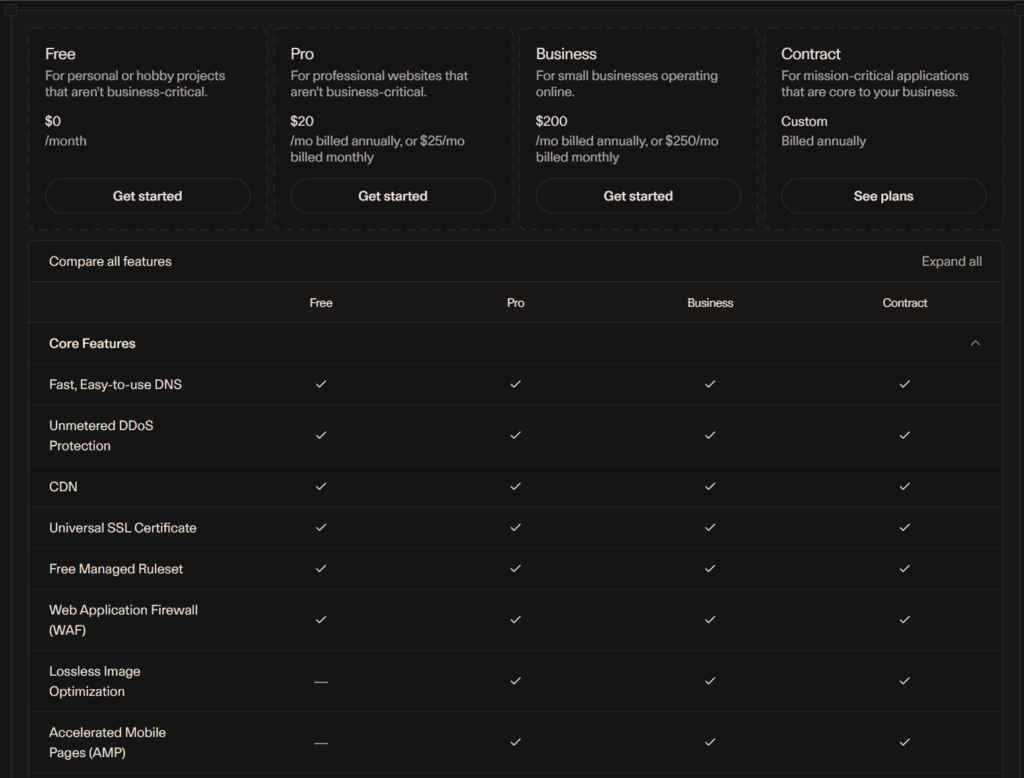
On the free plan you get the global CDN for faster delivery, a free security certificate, basic protection against denial-of-service attacks, basic bot and spam filtering, and a handful of rules you can configure. For a normal blog, this covers the meaningful benefits. The paid plans, starting around twenty dollars a month, mainly add advanced security rules, image optimization, and detailed analytics, things aimed at businesses, stores, and high-traffic or revenue-generating sites. For a small blog, those extras are usually unnecessary. The honest guidance you will hear from experienced people is consistent: start on free, and you will very likely never need to pay.
When a Small Blog Genuinely Benefits
Cloudflare is not equally useful for every blog. There are specific situations where a small blog clearly gains from it, and recognizing yours helps you decide.
You benefit most if your visitors are spread across the world while your hosting server sits in one country, because the CDN closes that distance and speeds up far-away readers. You benefit if you are on basic shared hosting, since Cloudflare can absorb traffic spikes and bot noise your small plan would struggle with. And you benefit if you have faced spam or basic attacks, since the filtering genuinely reduces that. On the other hand, if your audience is entirely local, your host already includes a CDN and strong security, and you have had no issues, the gains are smaller, though still rarely harmful.
The Honest Downsides Nobody Mentions
Most articles selling you on Cloudflare skip the trade-offs. There are a few, and you deserve to know them before deciding.
Setting it up means changing your domain’s nameservers, which is a real (though reversible) change to how your domain works, and it adds another service between you and your site to understand if something goes wrong. There is also a small risk of misconfiguration causing problems, which we will address next because it is the big one. And the free plan, while generous, gives you limited control and limited support, you are mostly on your own. None of these are dealbreakers for most people, but they are real, and pretending Cloudflare is pure upside with zero cost would be dishonest. It is a very good deal, not a magic free win with no strings.
The One Setup Mistake That Breaks WordPress Sites
If you do decide to use Cloudflare, there is one specific mistake that causes more broken WordPress sites than anything else, and knowing it in advance saves you a frightening afternoon.
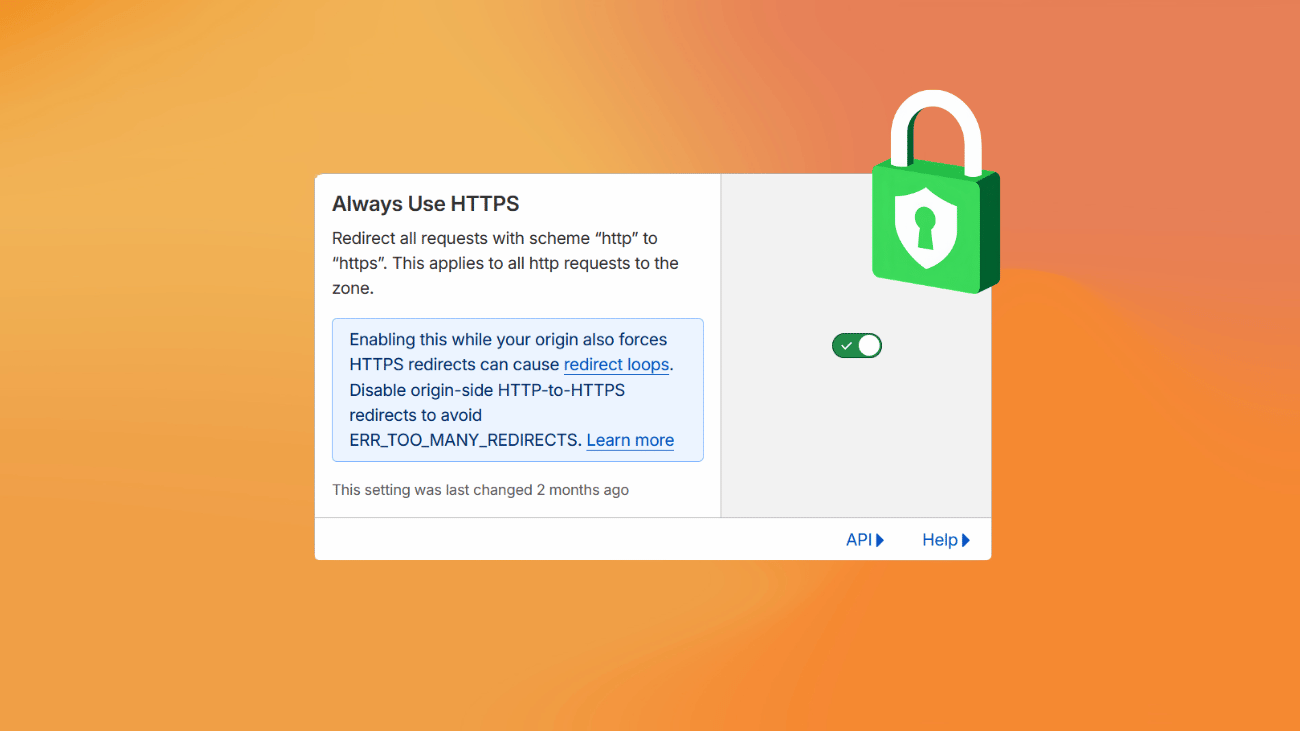
In Cloudflare’s settings there is an SSL/TLS encryption mode. One of the options, called “Flexible”, seems harmless but is the most common cause of the dreaded WordPress “redirect loop”, where your site endlessly reloads and becomes unreachable. The safe setting for almost every modern WordPress site is “Full (strict)”, which works as long as your host provides a security certificate, and in 2026 nearly all of them do for free. So the rule is simple: when you set up Cloudflare, do not leave SSL on Flexible, set it to Full (strict). If you only remember one technical detail from this article, make it that one, because it turns a smooth setup into a stressful one.
The reassuring part: the rest of the setup genuinely is straightforward and lives entirely in your browser, no server editing required. You create a free account, add your domain, let Cloudflare import your existing records, change your nameservers at your domain registrar, set that SSL mode correctly, and you are done. If a guide tells you it needs advanced server access, it is overcomplicating something simple.
So, Should You Use It?
Here is the honest bottom line, free of any pressure. For most small blogs, Cloudflare’s free plan is a reasonable yes: it offers real speed and security benefits at no cost, for a one-time setup that takes about fifteen minutes. It is not something you urgently need, and your blog is perfectly fine without it, but as free upgrades go, it is a solid one.
The one condition is doing the setup carefully, especially that SSL setting. If the idea of changing nameservers makes you nervous and your site is running fine, there is no shame in skipping it for now and revisiting later. Cloudflare is a tool, not a rite of passage. Use it if the benefits fit your situation, skip it if they do not, and either way, do not let anyone convince you that a small blog is somehow failing without it. Speed and security matter, and they also tie into how you rank, which our SEO guides explore, starting with the basics of how indexing and ranking work. If you want to squeeze more speed from your site first, our guide on speeding up WordPress without a plugin is a good companion to this one.
Frequently Asked Questions
Is Cloudflare free, and is the free plan really enough for a blog?
Yes, Cloudflare has a genuinely free plan, and for most small blogs it is enough. It includes a global CDN, a free security certificate, basic attack protection, and bot filtering. Paid plans mainly add features aimed at businesses and high-traffic sites that a typical small blog does not need.
Will Cloudflare slow down or break my site?
Done correctly, it should speed up your site, not slow it. The main risk is misconfiguration, especially leaving the SSL mode on “Flexible”, which can cause a redirect loop on WordPress. Setting SSL to “Full (strict)” avoids this. Setup is reversible, so mistakes can be undone.
Do I need Cloudflare if my host already has a CDN?
Probably not as urgently. If your host already provides a CDN and strong security, Cloudflare’s added benefit is smaller. It can still help, but the gain is less dramatic. Check what your hosting already includes before adding another layer you may not need.
Is it hard to set up Cloudflare on a small blog?
Not really. The whole process happens in your browser and takes about fifteen minutes: create an account, add your domain, let it import your records, change your nameservers, and set SSL to Full (strict). No server editing is needed. The SSL setting is the one step worth doing carefully.
Should a brand new blog set up Cloudflare right away?
It is optional. A brand new blog works perfectly without it, so there is no urgency. If you are comfortable with the setup, the free benefits are nice to have early. If it feels intimidating, focus on content first and add Cloudflare later. It is an upgrade, not a launch requirement.