
You typed your own business name into Google, expecting to see your shiny new website. Instead, nothing. Or worse, you saw everyone else but you. It is a sinking feeling, and it makes you wonder if you did something wrong when you built the site.
Take a breath, because in most cases you did not break anything. A website missing from Google is one of the most common things beginners run into, and the reason is almost always something simple and fixable. The hard part is that there are several possible causes, and the advice online tends to throw all of them at you at once.
This guide does it differently. We will figure out which problem you actually have first, then fix only that. By the end, you will know exactly why your site is not showing up, and what to do about it.
First, Find Out If Google Even Knows You Exist
Before you change a single setting, you need to answer one question: has Google added your site to its index yet? This one check decides everything that follows, and skipping it is why so many people waste hours fixing the wrong thing.
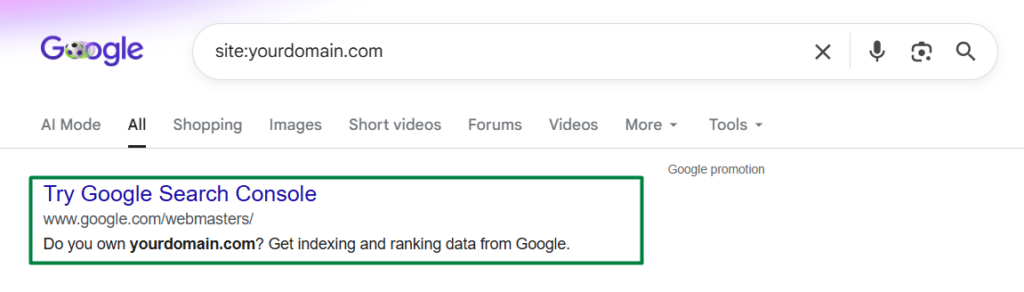
Here is how to check. Go to Google and type site: followed by your domain, with no space, like this: site:yourdomain.com. Then press enter. This tells Google to show you only the pages it has stored from your site.
You will get one of two results, and they point to two completely different problems.
If you see a list of your pages, Google has indexed your site. Your problem is not visibility, it is ranking. Your pages exist in Google, but they are sitting too far down the results for anyone to find them. We will cover that further down.
If you see “Your search did not match any documents” or only a stray page or two, Google has not properly indexed your site yet. That is a different problem, and the next few sections are written for you. One quick note: the site: check is a rough snapshot, not a perfect count. It often shows only a fraction of what is really indexed, so treat it as a yes or no signal, not an exact number.
If Your Site Is New, It Might Just Be Too Soon
This is the most common reason of all, and the most overlooked, because it does not feel like an answer. If you launched your site in the last few days or weeks, the honest truth is that Google may simply not have gotten to you yet.
Google finds new sites by crawling links across the web until it stumbles onto yours. For a brand new site that nobody links to yet, that discovery can take days, and sometimes weeks. Nothing is broken. You are just early.
But you do not have to sit and wait. Instead of hoping Google finds you, you can introduce yourself directly. That is exactly what Google Search Console is for, and it is the single most useful thing you can do for a new site. We walk through the whole setup in our guide on how to add your website to Google Search Console, including how to submit your sitemap and request indexing so Google comes to you instead of the other way around.
If your site is new and you have not set up Search Console yet, stop here and do that first. It very often solves the whole problem, and the rest of this guide is only needed if it does not.
Check If You Accidentally Told Google to Stay Away
Here is the cause that catches more beginners than any other technical setting, especially on WordPress. Without knowing it, you may have switched on a setting that politely asks Google not to index your site at all.
When you build a site, many platforms and developers turn on a “hide from search engines” option so the half-finished site does not get indexed. The problem is that this switch is easy to forget, and your site quietly stays invisible long after launch.
On WordPress, check this first. Go to Settings, then Reading, and look for a box labeled “Discourage search engines from indexing this site.” If it is ticked, that is very likely your whole problem. Untick it, save, and you are done.
There are two other places this same “stay away” message can hide. A noindex tag can be set on individual pages, often by an SEO plugin, which tells Google to skip just that page. And your robots.txt file, a small file at yourdomain.com/robots.txt, can block Google from crawling parts or all of your site. If you are comfortable, open that file in your browser and look for a line that says Disallow: / on its own, because that single line blocks your entire site.
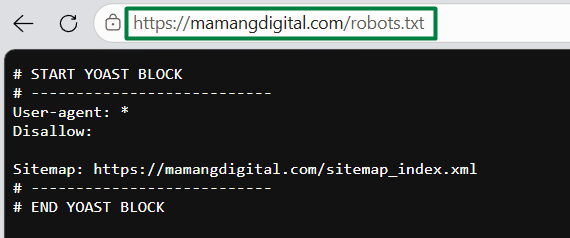
If any of these were switched on, fixing them is the easy part. The slower part is that Google needs to re-crawl your site to notice the change, which brings us to a theme you will see throughout this guide: most fixes work, but none of them are instant.
Make Sure Google Can Actually Read Your Pages
Sometimes the door is open, but the room is empty. Google can reach your site, but it cannot find real content to index. This happens more often than you would expect, and it usually traces back to one of two things.
The first is a site with almost no content. If your pages are nearly empty, or every page repeats the same thin text, Google may crawl them and decide there is nothing worth storing. Indexing is not automatic. Google chooses what it keeps, and it leans toward pages that actually say something useful.
The second is content that loads in a way Google struggles to see. Some site builders render everything with heavy scripts, so when Google looks at the raw page, it finds an empty shell. This is rarer on standard WordPress or Blogger setups, but it is worth knowing if you used a less common builder.
The fix here is not a setting, it is substance. Give each important page clear, genuine content that a real person would find helpful. This is also where good habits start paying off, because the same content that helps Google index you is the content that eventually ranks you.
When You Are Indexed but Still Cannot Be Found
Now back to the other group, the people whose site: search did show their pages. If Google has indexed you but you still cannot find yourself by searching normally, you are dealing with ranking, not indexing. These feel the same from the outside, but they are solved in completely different ways.
The most common reason here is simple. You are searching for competitive words that bigger, older sites already dominate. If you search a broad term like “coffee shop” and you are a brand new cafe, you are technically in Google, just on page nine where nobody looks.
Try this instead. Search for something only your site would have, like your exact business name, or a full sentence copied from your homepage in quotation marks. If you appear for those, your site is healthy and findable. You are simply not ranking for the popular terms yet, and that is a normal starting point, not a failure.
Climbing for competitive terms is the long game, and it comes from steady SEO and content over time, not a single switch. The encouraging part is that being indexed means the foundation works. Now it is about giving Google reasons to rank you higher, which is a topic in its own right.
The Rare but Serious Cause: a Google Penalty
Most guides bring this up early and scare everyone. We saved it for last on purpose, because for a normal new site, it is the least likely explanation by far. Still, you should know it exists.
A manual penalty is when Google decides a site broke its rules, through things like spammy links, copied content, or aggressive keyword stuffing, and removes it from results. If this happened, Google tells you directly. Inside Search Console there is a Manual Actions report, and a penalty shows up there in plain language.
If you built your site honestly and wrote your own content, you almost certainly do not have one. But this is another quiet reason to set up Search Console early, because it is the only place Google will actually tell you something is wrong, instead of leaving you to guess.
Your Step by Step Plan to Get Found
Let us turn all of this into a simple order of operations. Instead of panicking over every possible cause, work through these in order and stop when you find your answer.
- Run the
site:yourdomain.comcheck to learn whether you have an indexing problem or a ranking problem. - If your site is new, set up Search Console, submit your sitemap, and request indexing, then give it a few days.
- Check the WordPress “discourage search engines” box, any noindex tags, and your robots.txt file for accidental blocks.
- Make sure each important page has real, useful content that Google can read.
- If you are already indexed, test your exact business name to confirm you are findable, then focus on SEO to climb for harder terms.
- Only if all else looks fine, check the Manual Actions report in Search Console for a penalty.
The thread running through almost every fix on this list is patience. Google moves on its own schedule, and a lot of what feels like a broken site is really just Google catching up. Give each change a few days before deciding it did not work.
At Mamang Digital, getting found is the first hurdle every new site clears, and almost always the answer is one of the simple causes above, not anything you did wrong. Start with the site: check, take the steps in order, and your site will find its way into Google.
Frequently Asked Questions
How long does it take for a new website to show up on Google?
For a brand new site, anywhere from a few days to a few weeks is normal. You can speed this up by setting up Google Search Console, submitting your sitemap, and requesting indexing, which invites Google to come to you instead of waiting for it to find you.
Why does my website show up on one device but not another?
That is usually personalization, not indexing. Google tailors results based on your location, history, and the account you are signed into, so a site you have visited often may appear for you but not for a stranger. To check fairly, search in a private or incognito window.
I can find my site by name but not by keywords. Is something wrong?
No, that is completely normal for a newer site. Appearing for your exact name means you are indexed and findable. Not appearing for popular keywords just means you have not climbed the rankings for those competitive terms yet, which takes time and ongoing SEO.
Does submitting my site to Google guarantee it will show up?
It strongly helps, but it is not an absolute guarantee. Submitting through Search Console gets Google to crawl you faster, yet Google still decides what to index based on whether your pages have real, useful content. Submission plus genuine content together is what gets you found.