The plan names are misleading, and it’s why people pick the wrong one. “20x” sounds like you’re getting twenty times what Pro gives you. For most people who actually need to upgrade, the real gain is a fraction of that.
The 5x and 20x only apply to one of the two limits, the five-hour session. There’s a second limit running alongside it, the weekly cap, and that one barely moves between tiers. People who jump from Max 5x to Max 20x report their weekly capacity going up by roughly 1.7 times, not the 4 times they expected.
So this isn’t just a price list. The thing that decides which plan is right for you isn’t how heavily you use Claude, it’s which wall you actually hit. That’s what we’ll work out.
The Prices and What’s in Them
Start with the straightforward part. These are the official prices from Claude’s pricing page, as of August 2026.
| Plan | Price per month | Capacity per 5-hour session |
|---|---|---|
| Free | $0 | Smallest |
| Pro | $20 | At least 5x Free |
| Max 5x | $100 | 5x Pro |
| Max 20x | $200 | 20x Pro |
Pro drops to $17 a month if you pay annually. Max 20x is $200 whether you pay monthly or up front for the year. None of these include tax, and Anthropic states plainly that prices can change at any time.
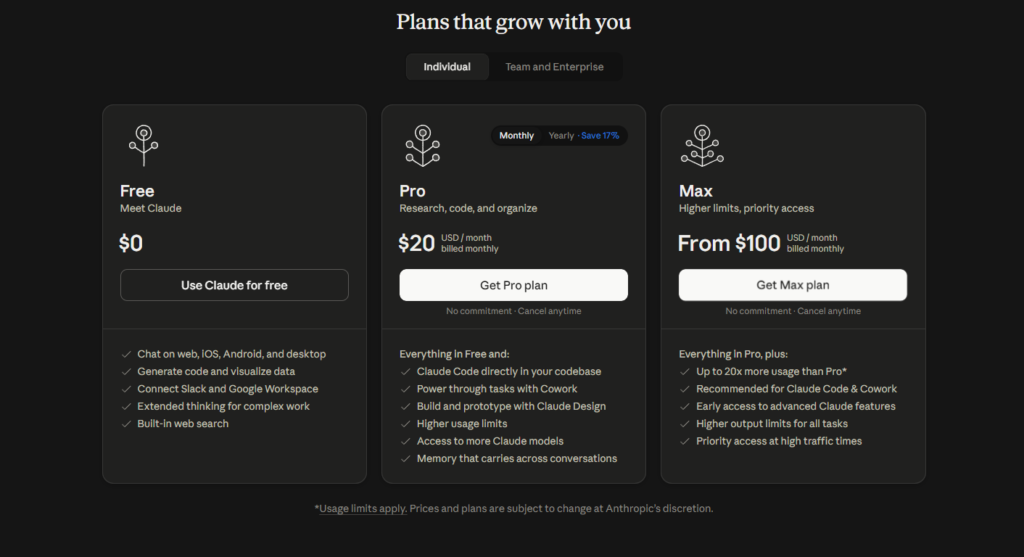
One thing to clear up first. Every paid plan can use the same models, including Opus, the most capable one. The plan doesn’t decide which model you get. It decides how much of it you can use before you hit a limit. Paying for Max doesn’t buy a different Claude, it buys the same Claude with more room.
Anthropic Doesn’t Publish a Message Count
You’ll find plenty of articles quoting exact numbers. “225 messages per 5 hours on Max 5x”, “900 on Max 20x”. It’s worth knowing where those come from, because it changes how much you should trust them.
Anthropic has never published a message or token count for any plan. The reason is reasonable: usage depends on how long your conversations are, which model you’re using, whether you attach files, and whether tools get called. One long message with a big file burns far more than ten short questions.
So every message figure you read is a third-party test, not an official number. Useful as a rough picture, not something to hold anyone to. If an article shows message counts as though they were a published spec, it’s inventing a precision that doesn’t exist.
The only official thing is the comparison itself: Pro is at least 5x Free, Max 5x is five times Pro, Max 20x is twenty times Pro. Everything past that is an estimate. Being able to tell a real figure from an invented one matters more than ever with AI, something we ran into again with Claude’s text watermark, where the headline claimed far more than the facts supported.
Two Limits Running at Once
This is the part most guides skip, and it’s the one that decides whether an upgrade is worth it.
Every paid plan has two limits running at the same time.
The five-hour session limit. This resets every five hours. The 5x and 20x apply here. Max 20x really does give you far more capacity per session than Pro.
The weekly limit. This sits on top of the session limit, across all models. And here’s the surprise: it barely scales when you move up a tier.
The effect is real. Someone upgrading from Max 5x to Max 20x, expecting four times the capacity, often finds their weekly capacity rising only about 1.7 times. Because what quadruples is the per-session limit, while the weekly wall stays nearly where it was.
So before paying five times more, the right question isn’t “how heavy is my usage”, it’s “which wall am I hitting”.
| You run out… | The wall | Does upgrading help? |
|---|---|---|
| A few times a day, then recover soon after | Five-hour session | Yes. This is what Max scales. |
| Mid-week, then stuck until the weekly reset | Weekly | Barely. A higher tier adds little. |
If you run out a few times a day but recover after a few hours, your wall is the session, and Max is the fix. If you run out on Wednesday and can’t do anything until next week, your wall is the weekly cap, and moving from 5x to 20x won’t solve it nearly as much as you’d hope.
The Quota Is Shared With Claude Code
If you use Claude Code, there’s something you have to know before picking a plan.
Pro and Max quota is one pool, shared between Claude in the browser and Claude Code. Every prompt, file read and tool call draws from the same allowance.
That means a day spent chatting with Claude in the browser leaves less quota for Claude Code in the same session. Two products, one wallet. It catches out people who assume Claude Code has its own separate allowance.
For most people using Claude Code seriously through the day, this is the main reason to move up to Max. Not because the chat side runs short, but because long coding sessions drain the shared pool quickly.
How to See Your Own Usage
Every estimate above matters less than one real number: your own usage. And you can see it.
In the Claude app, open Settings » Usage. There’s a progress bar for the current session and one for the current week, with reset times. If you use Claude Code, type /usage or /status inside it.
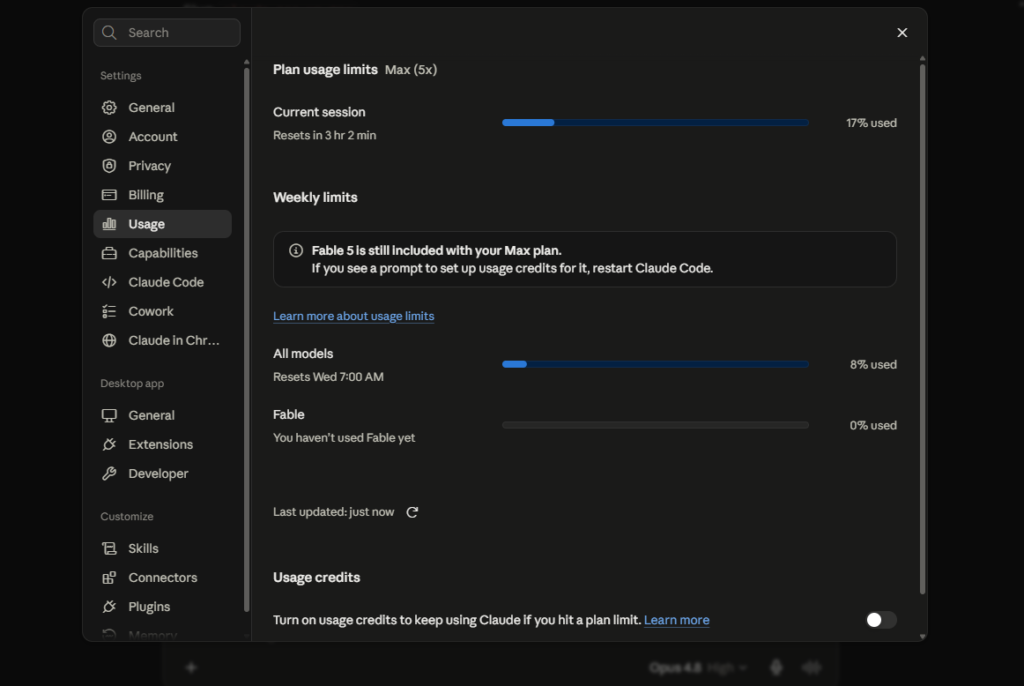
Watch which bar fills first. In the example above, the session bar sits at 17% used while the weekly bar is only at 8%, which tells you the session is being spent faster than the week. If the session bar keeps maxing out while the weekly bar still has room, your wall is the session, and Max is worth it. If the weekly bar fills up while the session rarely does, upgrading the tier won’t help much.
This removes the guesswork entirely. Don’t pay five times more on a hunch when this screen can just tell you the answer.
Try Pro First, Not Max
This is the advice the articles selling big numbers rarely give, and it’s the one that saves you the most money.
There’s no free trial for Max, on either tier. Anthropic also states there are no standing discounts. So if you’re not sure which limit is your problem, Pro at $20 is the cheapest way to find out.
Use Pro for a month. Look at the Usage screen. If you rarely hit a quota warning, Pro is enough and Max is wasted money. If you hit the wall more than once or twice a week, you’ve got real evidence the upgrade is warranted, and you already know which wall you’re hitting, so you can pick 5x or 20x correctly.
Moving from Pro to Max makes sense when one person genuinely keeps running out, not when you just want it to feel faster. Max buys headroom, not a different Claude.
So Which Should You Pick
In short, split by who you are.
Light user. A few questions a day, rarely see a quota warning. Free might cover you. If you need a bit more, Pro. Don’t consider Max at all.
Medium user. Claude most days for work, occasionally hitting the wall. Pro is the starting point and probably enough. Move to Max only if the Usage screen genuinely shows you running out often.
Heavy user, especially Claude Code. Long coding sessions that drain the shared pool fast. This is where Max makes sense. Start at Max 5x. Go to 20x only if the wall you hit is the session, not the weekly cap, because for the weekly wall, 20x gives only a little more than 5x.
Notice none of those say “just get 20x because it’s the biggest”. The most expensive plan only makes sense for a very specific usage profile, and most people aren’t it.
The Bottom Line
Every paid plan gives you the same Claude, the same models included. What you’re buying is room, not a different capability.
The 5x and 20x apply only to the five-hour session. The weekly limit barely rises, so the jump from 5x to 20x is far smaller than it looks if your wall is the weekly one. Before you pay, open Settings, Usage, and see which bar fills first. That one number beats every estimate on the internet, including the ones in this article.
And because Claude’s prices and limits change fairly often, check the official pricing page before you decide. The numbers here are right as of writing, but the date matters. If you’re weighing up AI tools more broadly, it’s worth understanding how the whole search and content landscape is shifting too, which we covered in how Google search is becoming AI search.